



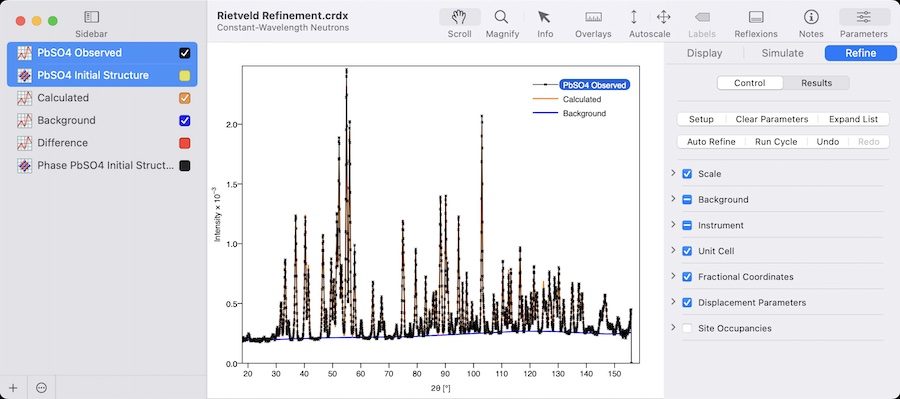
本文整合 CrystalDiffract 7.2.0 及后续版本的更新记录,覆盖 Windows 与 Mac 两个平台。内容来源于 CrystalMaker Software 官方 release notes,不包含页面以外的功能补充。
版本范围
本次整理范围包括:
- Version 7.2.0
- Version 7.2.1
- Version 7.2.2
- Version 7.2.3
- Version 7.2.4
Windows 版本中,7.2.0 发布于 2025 年 10 月 8 日;Mac 版本中,7.2.0 发布于 2025 年 9 月 18 日。后续 7.2.2 与 7.2.3 两个平台日期相同,7.2.4 则分别为 Windows 的 2026 年 4 月 13 日与 Mac 的 2026 年 4 月 15 日。
7.2.0:主要功能更新
Windows 与 Mac 共同更新
XRDML 文件导入
Observed data 现在可以从 Malvern Panalytical 生成的 “XRDML” 文件中导入。
Phase ID 功能更新
Phase ID 增加了更多筛选和识别选项,包括:
- 忽略 observed intensities。
- 忽略 missing peaks。
- 指定 required elements 字符串。
Ignore Intensities 适用于从饱和胶片读取扫描数据,或 intensity data 不可靠的场景,此时程序会更关注 peak positions。
Ignore Missing Peaks 适用于 observed sample 存在 preferred orientation,或 dataset 不完整的情况,例如基于固定 zone axis 的 single-crystal diffraction pattern 创建的 faux powder profile。
Required Elements 允许用户输入以空格分隔的元素符号。未包含所有指定元素的 candidate phases 会被排除。
Coloured Film Strips
新增 Film colouring mode:“Pattern Colour”。在该模式下,程序显示常规 greyscale film,并使用 pattern colour 进行着色。
Display Inspector 中的 “Film” group 也新增 colour button;当未设置 “Pattern Colour” mode 时,该按钮处于禁用状态。该选项在同时显示多个 films 时更适用。
仪器参数导入与导出
Refine/Parameters inspector 的 Instrument group 中新增 Actions button,可将所有参数保存到 text file,也可以导入参数。该功能用于支持常规 refinement,尤其适用于 neutron diffraction 等可能包含大量 instrumental parameters 的场景。
Toolstrip 与工具调整
Arrow 和 Move tools 的位置进行了交换,以与 CrystalMaker 和 SingleCrystal 的布局保持一致。
Toolstrip 右侧新增 List button,用于快速切换 Reflexions list。Legend 和 Title 也新增切换按钮。
屏幕工具支持键盘快捷键:
- H = hand / scroll tool
- A = Arrow tool
- V = moVe tool
- Z = magnify / zoom tool
更改 screen tool 时,active window 中会显示相应 subtitle。还新增 contextual menu,用于切换 toolstrip 和/或 Reflexions list。
Search Scope Menu
Search field 现在使用下拉式 Scope menu,替代原来的水平 Scope bar。各个 menu items 带有 tooltips,便于说明其用途。该设计也便于在较小屏幕尺寸中显示更多选项。
Phase ID 数据库更新
内部 Phase ID diffraction database 使用来自 Crystallography Open Database(C.O.D.)的 522,000 个 structures 进行更新。
在常规 diffraction simulation 过程中,约 2,000 个未满足完整性标准的文件被排除,保留约 520,000 个 structures。与 CrystalDiffract 7.1 相比,增加约 20,000 个 structures。
其他共同更新
- 新增 “Autoscale Intensity from Zero” 指令,位于 diffraction pane contextual menu,同时也在主菜单 View > Intensity > Autoscale from Zero 中提供。
- Reflexions pane 中的 Peaks & Phases tabs 进行了重新设计。
- Wavelength sheet 和 Simulate inspector 的 Instrument group 中新增 Ag x-ray target preset。
- Crystal editor 会阻止输入带空格或非 ASCII 字符的 site labels。
- 修正 Phase ID patterns 中 peak widths 设置不正确的问题。
- 修正在不同 x-axis types 之间切换时 Phase ID patterns 可能消失的问题。
- 修正 Samarium reference structure,加入正确的 “alpha” phase 及其 9R structure,以及带 dhcp structure 的 high-pressure polymorph。
- Peak Finder 的 minimum peak separation 现在可以从 Preferences/Settings panel 正确设置。
Mac 7.2.0 额外更新
Mac 版本 7.2.0 增加了对 macOS 26 “Tahoe” 新 “Liquid Glass” interface 的支持。相关变化包括:
- 界面 headers/footers 中更多使用 translucency。
- toolbar 包含一系列 translucent lozenges,并通过新的 inspector separator 保持在 Diffract pane 上方。
- macOS 11 或更高版本用户可获得 refined user interface 和 discrete Inspector pane。
- Sidebar 左下角的 “+” 和 Actions buttons 被移除,“Add” button 恢复到 toolbar,Actions 可通过 contextual menu 使用。
- 默认 toolbar state 改为 “Icon Only”。
- 改进 Sidebar colour checkboxes,以匹配 Tahoe 及早期 macOS。
- Sliding sidebars 增加 shadows 和 transparency。
- 使用 revised application icon,以匹配 macOS 26 Tahoe 的 rounded square 风格。
- Mac 版本还新增了 Multi-Touch Rotation of Reflexions List。用户可将鼠标指针放在 Reflexions List 上,通过向右旋转切换到 vertical layout,或向左旋转切换到 horizontal layout。
- Mac 版本 7.2.0 还修正了 toolbar items 在 “Text” mode 中不显示 titles,以及 toolbar “overspill” menu 中 items 不显示 icons 的问题,并增加了防止关闭 document window 且使用 colour panel 时可能发生崩溃的代码。
7.2.1:Control Strip、Gallery 与 Refinement 相关更新
Windows 7.2.1
Windows 7.2.1 发布于 2025 年 11 月 27 日。
该版本移除了 Reflexions pane 中 Reflexions、Peaks 和 Phases lists 的 header bars,并在右侧加入较低调的 control strip。
点击 Control Strip 会打开 Search popover(Reflexions)或 drop-down menus(Peaks、Phases)。Peaks 和 Phases 的菜单包含在 Observed Reflexions 与 Phase ID 之间切换的指令。
Gallery Window 方面,因 YouTube embedded players 政策变化导致旧版本中 video playback 出现问题,该版本修正了视频播放。
其他更新包括:
- 改进 low-wavelength experiments 下的 Rietveld Refinement。refinement engine 现在使用 observed data 的完整范围来计算 minimum d-spacing。
- 重新设计多个 menu 和 toolbar icons。
- 修正 Phase ID score values 的计算问题。
Mac 7.2.1
Mac 7.2.1 发布于 2025 年 11 月 17 日。
该版本同样引入 Control Strip,移除 Reflexions、Peaks 和 Phases lists 的 header bars,并通过右侧 control strip 提供 Search popover 或 drop-down menus。
Gallery Window 根据用户反馈进行了调整,使 Light 和 Dark modes 有更显著区分。Browser pane 使用 window background colour,文字使用对比色;header text 更大,并去除 icons 和 underlines。
视频播放同样得到修正,并使用带专用关闭按钮的集成式 video player。
Mac 版本还包含多项 macOS 26 “Tahoe” 相关处理:
- 修正 translucent sidebar 出现在 window “traffic light” control group 外侧的外观问题。
- 改进 Notes Inspector,使其延伸到 toolbar。
- 改进 macOS 11-13 的 Inspector display,使 toolbar buttons 直接出现在 Inspector pane 中。
- 增加 overbar symbols 在 macOS 26 “Tahoe” 上显示的处理方式,用于 symmetry inversion axes 和 negative indices 等显示。
- 使用 revised application icon,并支持 default、dark、clear 等 view styles。
- Peak Tips 和 Subtitles 调整为更圆角的外观。
Bug fixes 包括:
- 修正 Output log multi-touch rotation 相关问题。
- 修正更改 simulation parameters 时仅当前选中 diffraction pattern 更新的问题,现在所有 patterns 都会更新。
7.2.2:Coaching Tips 与 Rietveld 相关修正
Windows 与 Mac 7.2.2 均发布于 2026 年 1 月 7 日。
该版本新增 Coaching Tips。初启动程序时,会显示一组 “Coaching Cards”,提供提示和可选动作,例如显示 User's Guide、Update Guide 或切换 Sidebars。
用户也可以通过 Help > Tips for Getting Started 随时访问 Coaching Tips。
共同更新包括:
- 改进 Phase ID command:现在也会移除之前选中的 candidate phase diffraction graph。
- 从 Toolbar customization palette 中移除 Reflexions button,该按钮现在属于 Toolstrip。
- 更新 licensing support,以处理更高的 serial numbers。
- 修正使用 very-small wavelengths(小于 1.0 Å)进行 Rietveld Refinement 时的潜在问题。此前固定使用 minimum d-spacing 0.5 Å,可能阻止 higher-angle peaks 被模拟,并导致异常高的 chi-squared values。现在 minimum d-spacing 会基于 observed data 的范围自动计算。
- 修正 older files 中 TEM wavelength 未保存,进而导致 divide-by-zero error 的问题。
Mac 7.2.2 额外调整了默认 toolbar layout,确保 Sidebar button 位于左侧,Add button 位于其右侧。
7.2.3:Refined Parameters 与图表更新
Windows 与 Mac 7.2.3 均发布于 2026 年 2 月 26 日。
共同更新包括:
- “Refined Parameters” CSV file 现在包含 goodness-of-fit、weighted profile residual 和 expected profile residual。
- 当 simulation type 改变或 crystal 被编辑时,Reflexions List 现在会正确更新。
- 当 graph 的 x-axis 改变时,saved peak positions 现在会正确更新。
Windows 7.2.3 还修正了 Reflexions List 中 maximum intensity 计算显示的问题。
Mac 7.2.3 修正了 Magnify tool 在 logarithmic-Y plots 中 drag-to-magnify 功能的问题。
7.2.4:稳定性与保存相关修正
Windows 7.2.4
Windows 7.2.4 发布于 2026 年 4 月 13 日。
该版本包含以下改进和修正:
- 修正 peak profile 未定义时可能发生的崩溃。
- 修正创建并 subtract manual background 时可能发生的崩溃。
- 修正 Save 和 Save As 指令相关问题。此前程序经常将 documents 视为需要 “Save As” 而不是 “Save”,导致相关指令不能正确工作。
Mac 7.2.4
Mac 7.2.4 发布于 2026 年 4 月 15 日。
该版本包含以下改进和 system workarounds:
- 增加对 macOS 26.4 中系统问题的 workaround。该问题会导致 Inspector pane 被压缩,使部分 interface elements 被隐藏。
- 增加 workaround,以防止部分 documents 被打开两次;该情况通常发生在 state restoration 期间。
Windows 与 Mac 更新整合摘要
从 7.2.0 到 7.2.4,Windows 与 Mac 版本共同包含以下更新方向:
- XRDML observed data 导入。
- Phase ID 的筛选条件扩展。
- Pattern Colour film colouring mode。
- Instrumental parameters 导入与导出。
- Toolstrip、Reflexions list、Legend 和 Title 的界面更新。
- Search field 的 Scope menu 更新。
- 内部 Phase ID diffraction database 更新。
- Coaching Tips。
- Rietveld Refinement 在 low-wavelength / very-small wavelength 场景下的修正。
- Refined Parameters CSV 输出内容增加。
- Reflexions List 与 saved peak positions 更新行为修正。
Mac 版本还包含多项与 macOS 26 “Tahoe” 和 macOS 26.4 相关的界面处理、视觉调整和 workaround。Windows 版本在 7.2.4 中集中修正了 peak profile、manual background 和 Save / Save As 相关问题。